
 Submit Response is a weblog by Jack Mottram, a
 Diamond
I’m always keen to try out text editors, and Giles Turnbull pointed to an intriguing new offering yesterday.
Diamond is a quirky little app that, roughly speaking, works like a cross between Stickies and ‘distraction free’ editors like Write Room (which I gushed about a year ago), blocking out your desktop, other applications and the Menu Bar.
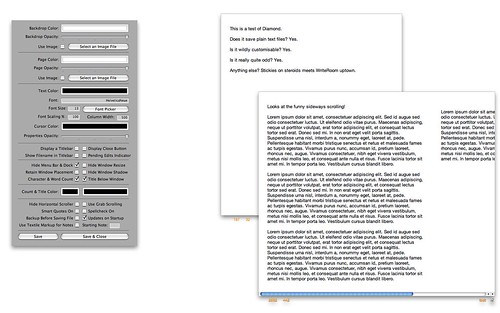
The most unconventional feature is the one I like the best: as you can see in the screenshot above, text is automatically broken up into columns, and so you scroll horizontally through a document, not vertically. Writing a review this morning, I used a near-fullscreen Diamond window, and found that having what you might call a holistic view of the piece helpful—re-ordering paragraphs was easier, repeated words leapt out, and proof-reading generally felt a lot quicker. It also has the only feature I really need in a text editor, a running word count, which floats unobtrusively at the bottom of the editing window.
Sure, there’s a certain lack of polish—you have to relaunch after changing a preference setting, for example—but Diamond is well worth checking out. It’s simple to use, customisable to suit your needs, and, best of all, lets you concentrate on writing without distractions.
Comments are closed
Comments are currently closed on this entry.